Writing records
Create, update, and delete.
create inserts one record. It takes the collection's input shape, typed from your schema, and returns the new record or the reasons it could not be written.
import { query } from 'ohnejs';

const result = await query('Posts').create({ title: 'Hello', body: '...' });
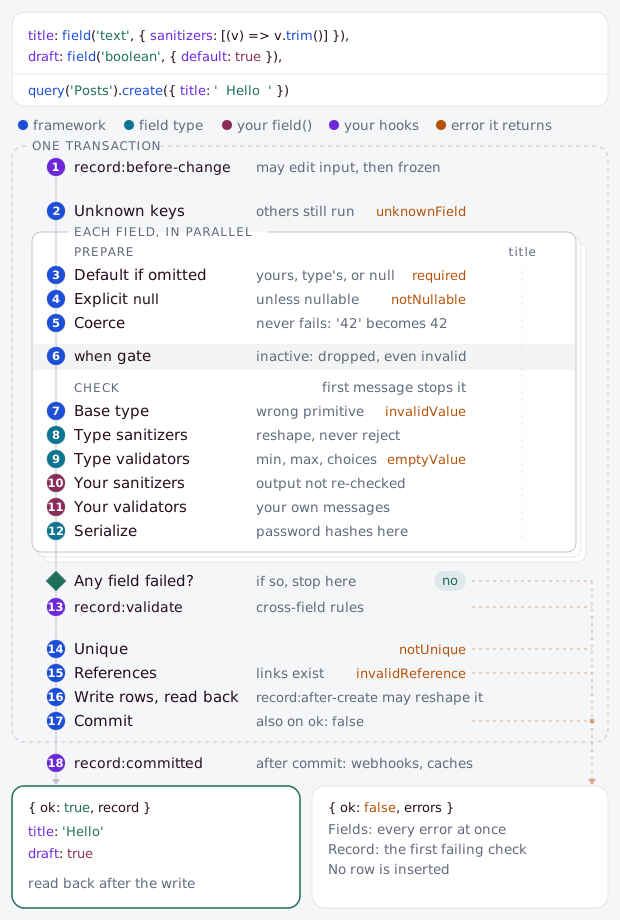
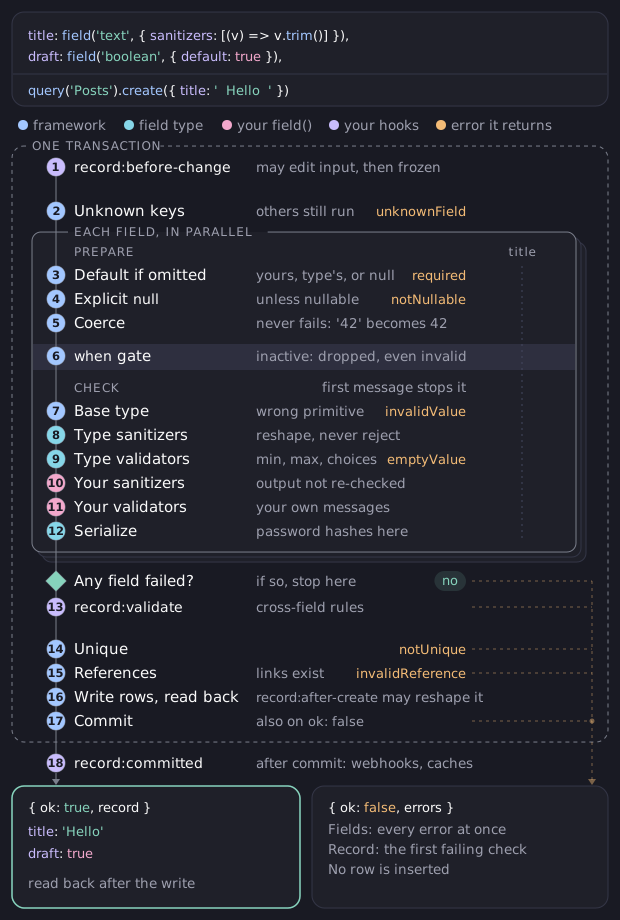
The whole write runs in one transaction: validation, uniqueness, references, the insert, and the derived rows all commit together, or nothing does.
The result
create never throws for a validation failure. It returns a result you check:
const result = await query('Posts').create({ title: 'Hello' });

if (result.ok) {
  result.record; // the new post, exactly as a read would return it
} else {
  result.errors; // { body: 'validation.required' }
}
On success, record is the full record read back after the insert. On failure, errors maps each failing field to a message:
- an untranslated key, like
validation.required, - a
{ key, params }object, when the message carries values, - or the string a custom validator returned.
A nested failure is listed under its path, like sections[2].title. To show a key as text, translate it with useT. A create that writes several locales and fails at one also names it in locale.
When you would rather handle failures as exceptions, createOrThrow returns the record directly and throws a ValidationError whose errors carries the same map:
const post = await query('Posts').createOrThrow({ title: 'Hello' });Left uncaught in a command, it prints each failing field with its reason.
When you catch it, use isValidationError, imported from ohnejs, to separate it from any other failure:
import { isValidationError, query } from 'ohnejs';

try {
  await query('Posts').createOrThrow({ title: 'Hello' });
} catch (error) {
  if (!isValidationError(error)) throw error;
  error.errors; // { body: 'validation.required' }
}
Inside an HTTP handler you rarely catch it yourself:
- A validation error becomes a
422whose body carries the errors, translated into the request's language. - A busy database becomes a
503with aRetry-After. Outside a handler, recognize it withisBusyErrorfromohnejsand retry the write.
Input
The input is typed per collection. A field is optional when it is nullable or has a default, and required otherwise, so the type tells you what a record needs before you run it.
await query('Posts').create({
  title: 'Hello',                   // required: a non-nullable text field with no default
  summary: null,                    // optional: nullable, so null is a value
  author: 'a1b2...',                // a `record` relation, given the target's UUID
  tags: ['t1', 't2'],               // a `records` relation, a list of UUIDs
  sections: [{ heading: 'Intro' }], // a `repeater`, a list of item shapes
});- Relations take
UUIDs, never nested records:authoris oneUUID,tagsa list of them. - A
records,repeater, orblockslist defaults to[], so you may omit it, unlessallowEmpty: falseor aminof 1 or more forbids the empty list. - An
objectis required like a scalar. Anullableone defaults to no group, and acceptsnullto say so explicitly. - Unknown keys are rejected, not ignored. A misspelled field fails with an
unknownFielderror at that key, so it never silently drops its value. - A value in the wrong primitive is converted when it reads as the right one, so form input works as sent.
textstores42as'42',booleantakes'true','1', and1, and the number types take a number sent as a string. Anything else fails with aninvalidValueerror.
A writable: false field is not part of either input, and an immutable field is not part of the update input.
Defaults
If you leave a field out of create, it gets its value from the first of these that is available:
- The field's own
default. - Its field type's default.
null, if the field is nullable.
A non-nullable field with no default requires input.
field('integer', { default: 10 });A default may be a value or a callback. A records, object, repeater, or blocks default must be a callback, because an object or array literal would be one mutable value shared by every created record. A record default is a plain UUID, so it stays a value.
A default runs through the field's sanitizers and validators like any value. A literal default they reject fails at boot, so default: '' on a text field needs allowEmpty: true. A callback default they reject fails the create that computes it.
Sanitizers and validators
A field cleans and checks its value through ordered lists of sanitizers and validators. Sanitizers change the value and never report an error. Validators return a message when the value is wrong, or undefined when it is fine. A field adds its own to the ones its field type ships:
field('text', {
  sanitizers: [(value) => value.trim()],
  validators: [(value) => (value.length > 280 ? 'Too long' : undefined)],
});
The dashboard shows the message under the field as markdown, like a field's description, with any link as plain text.
They run in this order, and the first message stops the run for that field:
- The field type's sanitizers.
- The field type's validators.
- The
sanitizersyou pass tofield(). - The
validatorsyou pass tofield().
A returned message always goes under the field's own name. To report a failure inside a composite value, a validator writes into ctx.errors instead.
Uniqueness and references
A unique field is checked before the insert, so a duplicate fails with a notUnique error that names the field, not a raw constraint error. Every relation is checked too: a link to a UUID that does not exist fails with an invalidReference error at that field's path.
const result = await query('Posts').create({ title: 'Hello', author: 'missing' });
result.ok;            // false
result.errors.author; // the reference does not exist
Through the collections API a link must also be one the caller can read, as the scope describes. query() only checks that the UUID exists.
A record link in a richText or link value is checked the same way, at the link's own path, like body[2].content[0].link. Only the links the write provides are checked: a link that every matched record already holds passes, even when its target is gone, and a delete never waits on a link.
Updating records
update changes every record a filter matches. update and delete exist only after a where, so you can never touch every record by accident:
const result = await query('Posts').where('status', 'draft').update({ status: 'published' });

if (result.ok) {
  result.records; // every matched post, in its new state
} else {
  result.errors; // the same field-to-message map create returns
}
update returns every matched record, re-read in its final state. updateOrThrow returns the array directly and throws on failure, exactly as createOrThrow does.
A singleton is the exception: it holds one record, so its update needs no where.
- An update is partial: fields you omit keep their values, and are never reset to a default or cleared.
- A when-gated field is written only to the records whose condition is true.
- It runs the same pipeline
createdoes, once for the whole call: validation, sanitizers, uniqueness, references. A field error fails the call before anything is written.
Lists on update
An update replaces a list field with the value you pass. It makes only the changes needed, and does not delete the whole list and build it again.
A records relation takes the new list of UUIDs. Links you drop are removed, links you add are appended, and the order follows your list. A link that stays keeps its place on the other side of the relation, so reordering one side never disturbs the other.
await query('Posts').where('UUID', id).update({ tags: ['t3', 't1'] });A repeater takes the new list of items, each a complete item just as create expects:
- Give an item its
UUIDto keep it. That row keeps its identity and is rewritten to the item you pass. - Omit the
UUIDto insert a fresh item. - Leave an item out to delete it.
Positions follow your order. A kept item is replaced whole: subfields you leave off reset to their defaults, so always send the complete item.
await query('Posts').where('UUID', id).update({
  sections: [
    { UUID: 'sec-1', heading: 'Kept, and edited' }, // survives, rewritten
    { heading: 'A brand new section' },             // inserted fresh
  ],
}); // any section you did not list is deleted- A
UUIDthat names no item on that record is an error. The update never silently takes an item from another record. - Item
UUIDs tie the update to one record. When the filter matches several, the write fails with asingleRecorderror at the field, so narrow the filter to one record first. A list withoutUUIDs writes fresh items to every matched record.
A blocks field takes envelopes and replaces its list the same way. An envelope is { block: 'Hero', fields: { ... } }, plus the item's UUID on update.
An object upserts its single child: pass a value to set it, or null to clear a nullable one.
await query('Posts').where('UUID', id).update({ meta: null }); // clears the objectDeleting records
delete removes every record a filter matches and reports the count:
const { deleted } = await query('Posts').where('status', 'spam').delete();A delete cascades: a record's child rows and its relation links are deleted with it. A record reference from elsewhere follows its own onDelete rule:
cascadedeletes the referencing row.setNullclears the link.restrictblocks the delete while the reference exists. Inside an HTTP handler that becomes a409. Outside one,isReferenceViolationfromohnejsrecognizes the error the blocked delete throws.
Duplicating records
duplicate copies a record into a new one, every locale it holds included:
const result = await query('Posts').duplicate(post.UUID, { slug: 'hello-again' });- It returns what
createreturns, andduplicateOrThrowreturns the copy. Both answerundefinedwhen the chain cannot read the source. - The second argument sets fields on the copy, at the locale it is created at: the chain's, else the default or the first one the source holds.
- A copy leaves out top-level
uniquefields, unreadable fields, andcopy: falsetypes likepassword. A required one fails withrequiredunless you set it, at every locale the copy writes.
To fill those on every copy, give the collection a duplicate function. It runs once per locale, with the source read at that locale:
import { defineCollection, field } from 'ohnejs';

export default defineCollection({
  fields: {
    title: field('text', { translatable: true }),
    slug: field('slug', { unique: true }),
  },
  duplicate: ({ source, input }) => ({
    ...input,
    title: `${source.title} (copy)`,
    slug: `${source.slug}-copy`,
  }),
});
Set duplicate: false instead to refuse every duplicate, as Uploads does.
Locales
On a collection with translatable fields, a write goes to the chain's locale. Writing translations covers creating and updating per locale, and a locale-scoped chain has deleteTranslation instead of delete.
Transactions
Pass an open transaction with use, and the write runs inside it instead of opening its own. Transactions covers opening one:
await useDatabase().transaction(async (tx) => {
  await query('Posts').use(tx).create({ title: 'Hello' });
});