Cards and tabs
Cards, tabs, and disclosures.
A card is the kit's surface: a bordered box that holds one thing on a page, with an optional header and footer. Tabs and disclosures fold more content into the same space and show one part at a time.
import { card, defineDashboardPage, page } from 'ohnejs/dashboard';

export default defineDashboardPage(() =>
  page(
    { title: 'Roster' },
    card('Thrall, Jaina Proudmoore, and Baine', { title: 'Raid roster', icon: 'users' }),
  ),
);

The body comes first, the options second. A body is anything a page renders: text, an element, a table, a chart.
The header
title, icon, badge, and actions build the header:
card(roster, {
  title: 'Raid roster',
  icon: 'users',
  badge: badge('4 / 25', { size: -2 }),
  actions: button('Invite', { icon: 'user-plus', variant: 'outline', size: -1 }),
})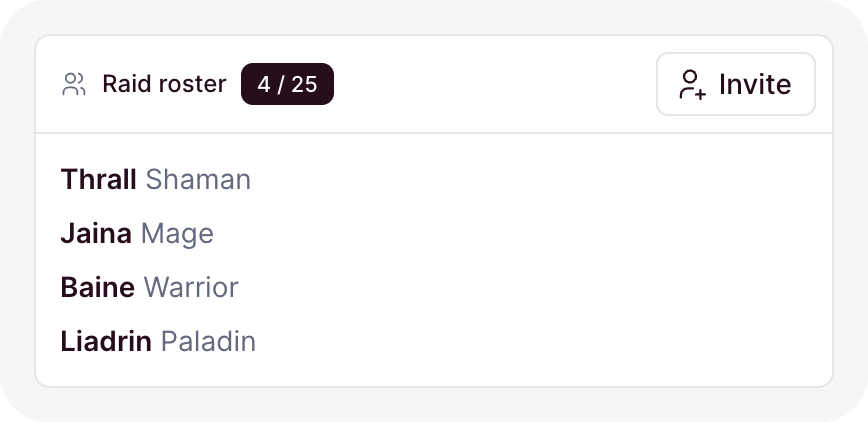
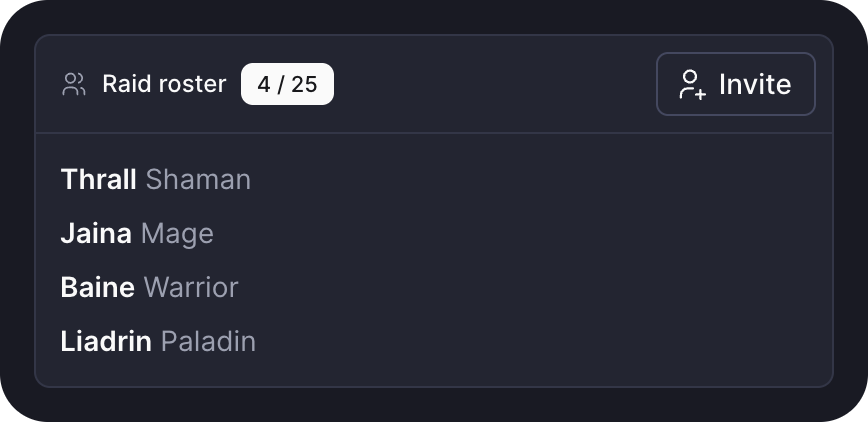
titletakes a message key or plain text.iconnames a Tabler icon, muted before the title.headerreplaces the built header with your own content.- A card with none of them has no header at all.
View all
more adds a muted link at the end of the header, to the page that shows everything the card summarizes:
card(recentRaids, { title: 'Recent raids', more: { href: '/raids' } })Omitted, its label reads "View all". Name the destination when it says more: more: { href: '/bank', label: 'Open the bank' }.
A card that links
href turns the whole card into one link, with a hover and a focus ring:
card(summary, { title: 'Icecrown Citadel', href: '/raids/icecrown' })- The whole surface is the link, never just the title.
- A linking card holds no other link or button, so its type refuses
actions,more,collapsible, andheaderbesidehref. - A stat tile links the same way.
Footer
footer renders under the body, behind a separating border:
card(settings.element, { title: 'Raid settings', footer: button('Save') })

It usually holds a form's save button, or a muted line saying when the data last changed.
Flush
flush: true drops the body padding, so a table or a list runs edge to edge:
card(lootList, { title: 'Loot', icon: 'trophy', flush: true })

Danger zone
tone: 'destructive' paints the border and the title in the destructive color, for actions that cannot be undone:
card(disband, { title: 'Danger zone', icon: 'alert-triangle', tone: 'destructive' })

const open = ref(true);

card(roster, { title: 'Raid roster', collapsible: { open } })
collapsible: truestarts open and keeps its own state.{ open }binds a ref, so your code can fold the card and read whether it is open.
Size and failures
sizefrom-2to2scales the card and everything inside it. Omitted, the card takes the size of its surroundings.- A function body that throws while it builds shows an error state inside the card, and the rest of the page keeps working.
Tabs
tabs shows one panel at a time under a row of tabs:
tabs([
  { name: 'roster', label: 'Roster', icon: 'users', content: () => roster() },
  { name: 'loot', label: 'Loot', icon: 'trophy', bubble: bubble('3'), content: () => loot() },
])

contentbuilds the panel each time its tab opens, and switching away disposes it. Keep state that must survive in a ref outside the panel.bubbleputs a count after the label.- The tab row shows only with more than one tab.
Controlling the tabs
active binds the open tab to a ref. With useSearchParam, the open tab survives a reload and a shared link:
const view = useSearchParam('view', { fallback: 'roster', choices: ['roster', 'loot'] });

tabs(
  [
    { name: 'roster', label: 'Roster', content: () => roster() },
    { name: 'loot', label: 'Loot', content: () => loot() },
  ],
  { active: view },
)- The ref types the names, so a tab named outside its values fails the typecheck.
- A value no tab carries shows the first tab.
- Omitted, the tabs keep their own state and start on the first.
Disclosure
disclosure hides content behind a row that opens it:
disclosure(() => h('p', null, 'Need before greed, always.'), {
  summary: 'What are the loot rules?',
  group: 'raid-faq',
})

- The content builds on the first open and stays mounted, so its state survives closing.
badgesits right after the summary, as it does after a card title.openbinds a ref. Omitted, the disclosure starts closed.- Disclosures sharing a
groupform an accordion: opening one closes the others.
Reach for tabs when the parts are peers a reader switches between, and a disclosure for detail most readers skip.