Lesson 02
Portfolio block
Add a portfolio block to Rayleigh: galleries an editor fills in the CMS, rendered by a Next component, with a full-screen slider that needs no library.
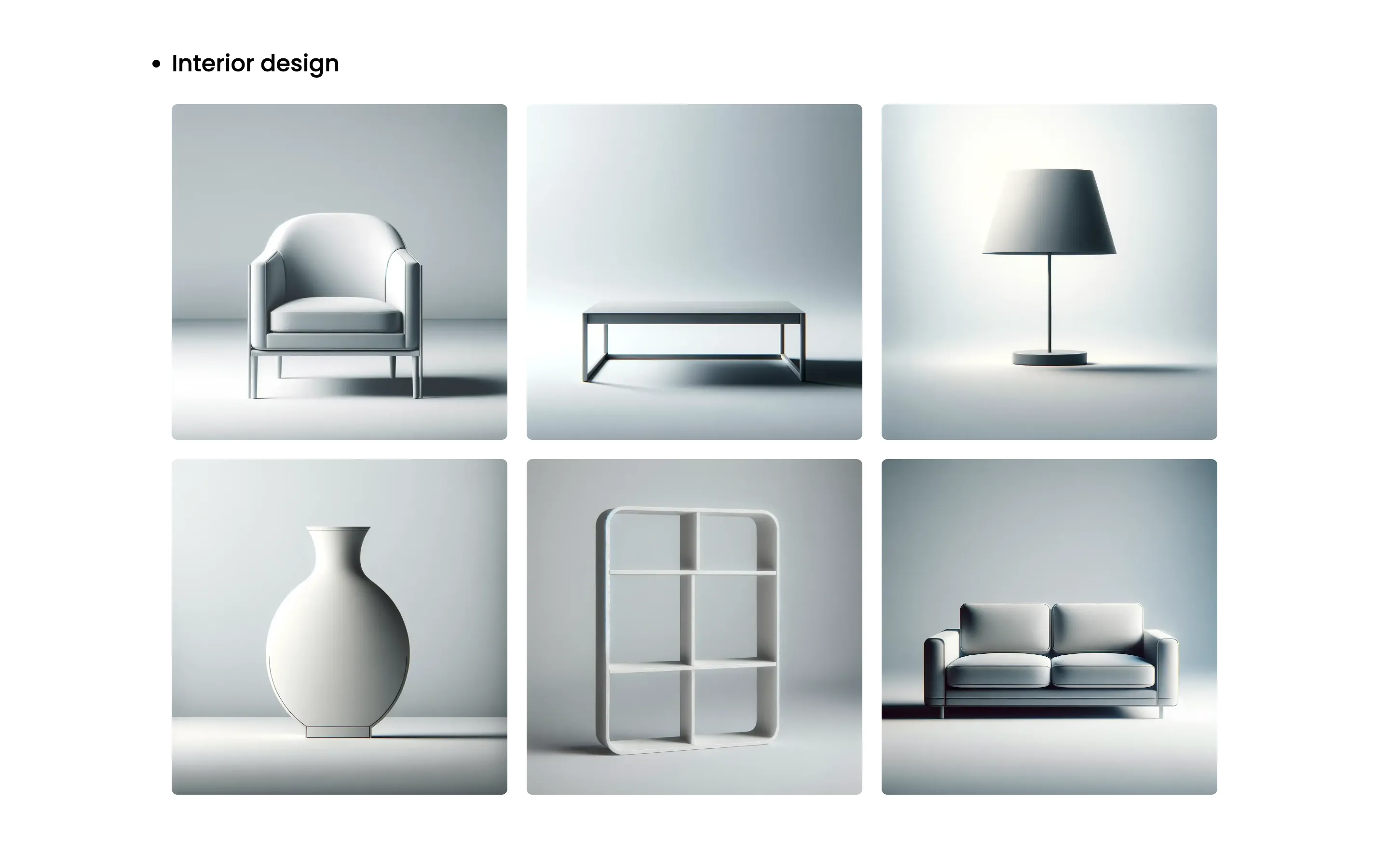
The block
A block is one shape of content a page can hold. The portfolio block is a title and a gallery, a repeater of images with captions:
import { defineBlock, field } from 'ohnejs';

export default defineBlock({
  description: 'A grid of images that open full screen on a click',
  fields: {
    title: field('text'),
    // A repeater is a list of items that share one shape, here an image and its caption.
    gallery: field('repeater', {
      allowEmpty: false,
      fields: {
        // The slider shows the image large, so a small one is refused at upload.
        image: field('image', { minWidth: 1024, minHeight: 1024 }),
        caption: field('text', { nullable: true }),
      },
      layout: [{ row: ['image | 16rem', 'caption'] }],
    }),
  },
  dashboard: { icon: 'layout-grid' },
});
Let Pages hold it:
    // The page's content, as a list of blocks. Each name here is a file in `blocks/`.
    content: field('blocks', { allow: ['Hero', 'Prose', 'Portfolio'] }),
The content
The seed fills an empty site with the demo content. It now uploads the gallery images to the media library, as an editor would, and builds the home page from them. See Boot files and Uploads.
Copy the images and their credits from this lesson's tag:
curl -sL https://github.com/ohnejs/rayleigh-next/archive/refs/tags/lesson-02-portfolio-block.tar.gz \
  | tar -xzf - --strip-components=1 \
    rayleigh-next-lesson-02-portfolio-block/apps/backend/seed/images \
    rayleigh-next-lesson-02-portfolio-block/apps/backend/seed/CREDITS.md
The captions live beside them:
// The demo copy of Rayleigh, which `boot/seed.ts` puts into the CMS.

/**
 * The two galleries of the home page, each image with its caption.
 */
export const galleries = [
  {
    title: 'Interior design',
    directory: 'interior',
    items: [
      ['modern-armchair', 'Modern armchair'],
      ['contemporary-coffee-table', 'Contemporary coffee table'],
      ['sleek-lamp', 'Sleek lamp'],
      ['elegant-vase', 'Elegant vase'],
      ['simple-bookshelf', 'Simple bookshelf'],
      ['stylish-sofa', 'Stylish sofa'],
    ],
  },
  {
    title: 'Exterior design',
    directory: 'exterior',
    items: [
      ['luna-bench', 'Luna bench'],
      ['aurora-lamp', 'Aurora lamp'],
      ['serenity-fountain', 'Serenity fountain'],
      ['zephyr-sculpture', 'Zephyr sculpture'],
      ['harmony-seating', 'Harmony seating'],
      ['mystic-path', 'Mystic path'],
    ],
  },
] as const;
The seed replaces the starter's home page with a hero and both galleries:
import { openAsBlob } from 'node:fs';
import { hook, query, useEnv } from 'ohnejs';
import { putUpload, updateUpload } from 'ohnejs/uploads';

import { galleries } from '../seed/content.ts';

/**
 * Uploads one image from `seed/images/` to the media library, as an editor would, and gives it its alt text.
 * Returns the upload's `UUID`, which an image field stores.
 */
async function upload(path: string, description: string): Promise<string> {
  const [directory, name] = path.includes('/') ? path.split('/') : ['', path];
  const file = await openAsBlob(new URL(`../seed/images/${path}`, import.meta.url));
  const { UUID } = await putUpload({ directory, name, body: file.stream(), size: file.size });
  await updateUpload(UUID, { description });
  return UUID;
}

// Boot files run before the schema sync creates the tables, so the seed waits for `schema:synced`.
// It fires on every start. See https://ohne.dev/docs/project/boot
hook('schema:synced', async () => {
  if (useEnv().get('NODE_ENV') === 'production') return;
  // Only an empty site gets the demo, so the seed never touches your edits.
  if (await query('Pages').exists()) return;

  const portfolio = [];
  for (const { title, directory, items } of galleries) {
    const gallery = [];
    for (const [name, caption] of items) {
      gallery.push({ image: await upload(`${directory}/${name}.webp`, caption), caption });
    }
    portfolio.push({ block: 'Portfolio' as const, fields: { title, gallery } });
  }

  await query('Pages').createOrThrow({
    title: 'Homepage',
    // `index` is the slug of the home page, shown at `/`.
    slug: 'index',
    status: 'published',
    content: [
      {
        block: 'Hero',
        fields: {
          heading: 'Welcome to Rayleigh',
          lead: [
            {
              kind: 'paragraph',
              content: [{ text: 'A minimalistic portfolio template made with ohne.' }],
            },
          ],
        },
      },
      ...portfolio,
    ],
  });

  // `Site` comes with the CMS: the site's name, which every page title ends with.
  await query('Site').update({
    name: 'Rayleigh',
    description: 'Rayleigh is a minimalistic portfolio template made with ohne.',
  });
});
The seed runs only on an empty site. Stop pnpm dev, delete the data and start again:
rm -rf apps/backend/.data apps/backend/.uploads
pnpm dev
The empty site asks for an admin account again. Create it in the dashboard.
The component
While pnpm dev runs, the CMS writes the new block's types into apps/web/ohne.ts. The component renders the grid, and opens the slider on a click:
'use client';

import dynamic from 'next/dynamic';
import { useRef, useState } from 'react';

import type { Block } from '../../ohne';
import type { Slide } from '../Slider';

import { Container } from '../Container';
import { IconSearch } from '../icon/Search';

// The slider's code loads the first time a visitor opens an image, not with the page.
const Slider = dynamic(() => import('../Slider').then((module) => module.Slider));

// `'use client'` lets this block react to clicks. `OhneBlocks` still renders it with its `fields`.
export function Portfolio({ fields }: Block<'Portfolio'>) {
  const [open, setOpen] = useState<number | null>(null);
  const buttons = useRef<(HTMLButtonElement | null)[]>([]);
  // An image field may be empty, so the gallery shows only the items that have one.
  const slides = fields.gallery.filter((item): item is Slide => item.image !== null);

  // Focus returns to the image that opened the slider, so a keyboard visitor keeps their place.
  function close() {
    buttons.current[open!]?.focus();
    setOpen(null);
  }

  return (
    <Container className="portfolio">
      <h2 className="portfolio__title">{fields.title}</h2>
      <div className="portfolio__grid">
        {slides.map(({ UUID, image, caption }, i) => (
          <button
            key={UUID}
            ref={(button) => {
              buttons.current[i] = button;
            }}
            type="button"
            className="portfolio__item"
            aria-label={caption ? `Open ${caption}` : 'Open image'}
            onClick={() => setOpen(i)}
          >
            <img
              src={image.url}
              width={image.width ?? undefined}
              height={image.height ?? undefined}
              alt={image.description ?? ''}
              decoding="async"
              loading="lazy"
            />
            <span className="portfolio__overlay">
              {caption && <span className="portfolio__caption">{caption}</span>}
              <IconSearch />
            </span>
          </button>
        ))}
      </div>
      {open !== null && <Slider slides={slides} start={open} onClose={close} />}
    </Container>
  );
}
OhneBlocks needs a component for every block. Name it in the page:
import { Hero } from '../../components/blocks/Hero';
import { Portfolio } from '../../components/blocks/Portfolio';
import { Prose } from '../../components/blocks/Prose'; <OhneBlocks blocks={page.record.content} components={{ Hero, Prose, Portfolio }} />And in the not-found page:
import { Hero } from '../../components/blocks/Hero';
import { Portfolio } from '../../components/blocks/Portfolio';
import { Prose } from '../../components/blocks/Prose'; <OhneBlocks blocks={page.content} components={{ Hero, Prose, Portfolio }} />Styles and icons
The grid and the slider get their stylesheets, and site.css imports them. The icons are small React components, the ones Rayleigh uses in every lesson:
/* Rayleigh's styles, in plain CSS. The order matters: tokens first, then the rules that use them. */
@import './fonts.css';
@import './tokens.css';
@import './base.css';
@import './layout.css';
@import './components.css';
@import './blocks.css';
The slider
The slider shows one image at a time, full screen:
'use client';

import { useEffect, useRef, useState } from 'react';

import type { Blocks, Upload } from '../ohne';

import { IconChevronLeft } from './icon/ChevronLeft';
import { IconChevronRight } from './icon/ChevronRight';
import { IconX } from './icon/X';

/**
 * A gallery item that has an image.
 */
export type Slide = Blocks['Portfolio']['gallery'][number] & { image: Upload };

/**
 * Props for `Slider`.
 */
export interface SliderProps {
  /**
   * The images to show, in order.
   */
  slides: Slide[];

  /**
   * The index of the image to open at.
   */
  start: number;

  /**
   * Called once the dialog has closed, by Esc, its button or a click beside the image.
   */
  onClose: () => void;
}

// A native `<dialog>` traps the focus, makes the page behind inert, and closes on Esc.
// The track snaps from slide to slide, so a touch swipe needs no script.
export function Slider({ slides, start, onClose }: SliderProps) {
  const dialog = useRef<HTMLDialogElement>(null);
  const track = useRef<HTMLDivElement>(null);
  const [index, setIndex] = useState(start);

  // The arrows sit beside the shown image, so the dialog learns its width.
  function measure() {
    const image = track.current?.children[index]?.querySelector('img');
    dialog.current?.style.setProperty('--image-width', `${image?.offsetWidth ?? 0}px`);
  }

  function go(to: number, behavior: ScrollBehavior = 'smooth') {
    const reduce = matchMedia('(prefers-reduced-motion: reduce)').matches;
    const clamped = Math.min(Math.max(to, 0), slides.length - 1);
    track.current?.scrollTo({
      left: clamped * track.current.clientWidth,
      behavior: reduce ? 'instant' : behavior,
    });
  }

  useEffect(() => {
    // React runs this twice in development, and a second `showModal` on an open dialog throws.
    if (!dialog.current?.open) dialog.current?.showModal();
    go(start, 'instant');
  }, []);

  useEffect(() => {
    measure();
    const realign = () => {
      go(index, 'instant');
      measure();
    };
    // A disabled arrow drops the focus out of the dialog, so the window listens for the arrow keys.
    const onKeyDown = (event: KeyboardEvent) => {
      if (event.key !== 'ArrowLeft' && event.key !== 'ArrowRight') return;
      event.preventDefault();
      go(index + (event.key === 'ArrowLeft' ? -1 : 1));
    };
    addEventListener('resize', realign);
    addEventListener('keydown', onKeyDown);
    return () => {
      removeEventListener('resize', realign);
      removeEventListener('keydown', onKeyDown);
    };
  });

  return (
    <dialog
      ref={dialog}
      className="slider"
      aria-label="Gallery"
      onClose={onClose}
      // A click beside the image, its caption and the buttons closes the slider, like a backdrop click.
      onClick={(event) => {
        if (!(event.target as Element).closest('img, figcaption, button')) dialog.current?.close();
      }}
    >
      <button
        type="button"
        className="slider__close"
        aria-label="Close"
        onClick={() => dialog.current?.close()}
      >
        <IconX />
      </button>
      <div
        ref={track}
        className="slider__track"
        onScroll={(event) =>
          setIndex(Math.round(event.currentTarget.scrollLeft / event.currentTarget.clientWidth))
        }
      >
        {slides.map(({ UUID, image, caption }, i) => (
          <figure key={UUID} className="slider__slide">
            <img
              className="slider__image"
              src={image.url}
              width={image.width ?? undefined}
              height={image.height ?? undefined}
              alt={image.description ?? ''}
              decoding="async"
              loading="lazy"
              onLoad={i === index ? measure : undefined}
            />
            {caption && <figcaption className="slider__caption">{caption}</figcaption>}
          </figure>
        ))}
      </div>
      <button
        type="button"
        className="slider__arrow slider__arrow--prev"
        aria-label="Previous image"
        disabled={index === 0}
        onClick={() => go(index - 1)}
      >
        <IconChevronLeft />
      </button>
      <button
        type="button"
        className="slider__arrow slider__arrow--next"
        aria-label="Next image"
        disabled={index === slides.length - 1}
        onClick={() => go(index + 1)}
      >
        <IconChevronRight />
      </button>
    </dialog>
  );
}
Open http://localhost:3000 and click an image. The arrows, the arrow keys and a swipe move through the gallery. Esc or a click beside the image closes it.
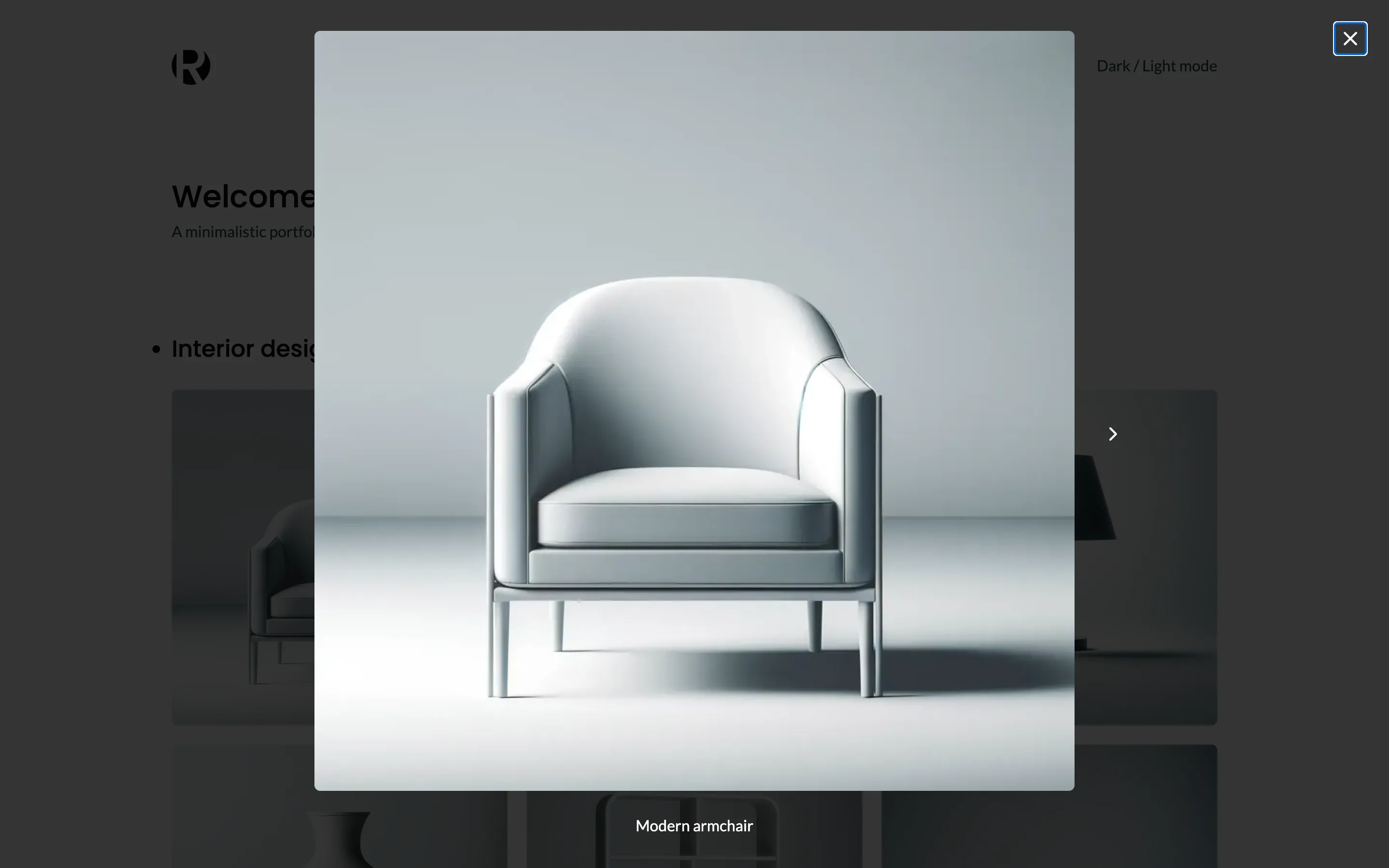
In the dashboard, open Homepage and change a caption: the website beside the form follows as you type. See The live editor.
Next, Header and footer moves the logo, the menu and the footer links into the CMS.
Checkpoint
The code at this lesson
Every lesson ends at a tag. Clone it to start from here, or compare it with yours.
git clone --branch lesson-02-portfolio-block https://github.com/ohnejs/rayleigh-next rayleigh